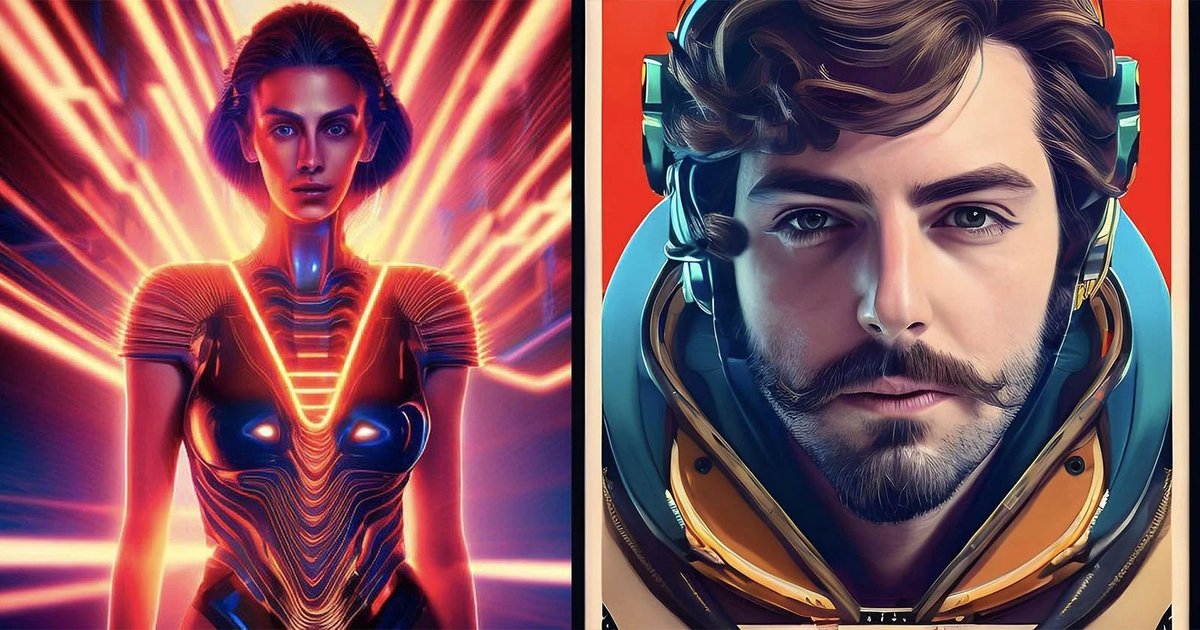
The Art of the Automated Autoportrait: Applications & Best Practices for AI Selfies to Enhance Your Look
Let's face it: our phones are practically extensions of ourselves, and the humble selfie has evolved from a simple snapshot into a personal brand statement, a creative outlet, and even a professional tool. But what if you could take that selfie and transform it with intelligence, not just filters? This is where the magic of AI selfies comes in, unlocking a universe of possibilities from subtle enhancements to dramatic stylistic shifts. Forget endless re-takes; modern AI-powered tools are redefining what’s possible with your front-facing camera.
These aren't your run-of-the-mill Instagram filters. We're talking about sophisticated AI, often powered by Generative Adversarial Networks (GANs) and diffusion models, that can analyze your features, understand context, and then create new elements or entirely new images based on your input. The result? Personalized, high-quality images that can genuinely enhance your look for any purpose.
At a Glance: Your Guide to AI Selfies
- What they are: AI selfies use advanced algorithms (like GANs and diffusion models) to transform your photos, not just filter them.
- Key applications: Generate celebrity selfies, create professional headshots from casual snaps, or transform into anime characters.
- How they work: AI analyzes your photo, then intelligently manipulates features, backgrounds, and styles to achieve desired effects.
- Choosing a tool: Consider your specific goal (e.g., professional, creative, fun) and evaluate features, ease of use, and output quality.
- Best practices: Start with a clear base photo, experiment with settings, and be mindful of ethical use and privacy.
Beyond the Filter: Understanding the AI Magic Behind Your New Look
Before we dive into the fun stuff, let's quickly demystify the tech. When you upload a selfie to an AI tool, it doesn't just slap a transparent layer over your face. Instead, it uses complex algorithms, often rooted in Generative Adversarial Networks (GANs) or newer diffusion models, to understand and then re-create your image.
Think of GANs as two AIs playing a game: one (the Generator) tries to create realistic fake images, and the other (the Discriminator) tries to spot which images are fake and which are real. They learn from each other until the Generator becomes incredibly good at creating images that are indistinguishable from real ones. Diffusion models work by gradually adding noise to an image and then learning to reverse that process, effectively "denoising" or generating new images from pure noise based on a text prompt or an input image.
This powerful tech allows AI selfie tools to do more than just lighten a shadow or smooth skin. They can:
- Manipulate facial features: Change expressions, adjust symmetry, even alter age.
- Modify backgrounds: Remove, replace, or stylize the environment behind you.
- Apply complex styles: Transform you into a painting, a cartoon, or even a different person's likeness.
- Adjust lighting and composition: Automatically correct unflattering conditions to present you in the best light.
The key takeaway? These tools aren't just superficial; they're genuinely transformative, offering robust solutions for everything from personal fun to professional branding. If you're ready to create AI selfies online, understanding this underlying capability helps you appreciate the potential.
Application 1: Star-Struck Selfies – Mingling with Celebrities (Virtually)
Ever dreamed of grabbing a selfie with your favorite movie star, pop idol, or historical figure? While a real-life encounter might be a long shot, AI selfie tools make the virtual version surprisingly accessible and realistic. This application goes beyond simple cut-and-paste jobs; it's about seamlessly integrating your likeness into a believable scene with a celebrity.
How It Works Its Magic
These tools leverage advanced face-swapping technology combined with sophisticated background customization. You upload your selfie, select your desired celebrity, and the AI does the heavy lifting. It carefully blends your facial features onto the celebrity's body or places you alongside them in a natural pose, then adjusts lighting, shadows, and color tones to make it look like you were genuinely there.
Imagine showcasing a "photo" of you and your favorite band on social media, or a playful image with a historical figure for a themed party invite. Tools like Vidnoz and SelfieWith are leading the charge here, offering intuitive interfaces where you can choose from a vast library of celebrities and even customize the background to match the scenario you envision. They even feature automatic lighting adjustments, so your "appearance" in a new scene feels utterly natural.
Best Practices for Believable Celebrity Selfies
- Start with a Clear Headshot: Your input selfie should be well-lit, facing forward, and relatively high-resolution. The better the initial data, the better the AI can work with it.
- Match the Mood: Consider the celebrity's typical demeanor or the context of the generated image. A serious expression might look out of place next to a grinning comedian, for example.
- Experiment with Poses: Some tools allow you to adjust your pose slightly or choose from various celebrity poses. This can significantly impact realism.
- Examine the Details: Zoom in and check for unnatural edges, mismatched skin tones, or awkward lighting. Most good tools allow for minor tweaks.
Application 2: The Professional Polish – From Casual Snap to Corporate Chic
In today's digital-first world, your professional headshot is often the first impression you make, whether on LinkedIn, a company website, or a job application. Yet, getting a professional photographer can be costly and inconvenient. This is where AI selfie tools offer an invaluable, cost-effective solution, transforming even the most casual selfies into impeccably polished headshots.
Elevating Your Professional Brand
This application is designed to enhance your online professional presence significantly. AI tools can take a decent selfie and apply a host of professional-grade improvements:
- Lighting Adjustments: Correct harsh shadows, brighten your face, and create studio-quality lighting effects.
- Background Removal & Replacement: Swap out your cluttered living room for a clean, professional studio backdrop, a blurred office environment, or a minimalist solid color.
- Professional Retouching: Subtly smooth skin, remove blemishes, whiten teeth, and even adjust hair without making you look overly airbrushed or unnatural.
- Outfit Changes (for some advanced tools): Believe it or not, some AI tools can even swap your casual top for a professional blazer or shirt, adding another layer of versatility.
Vidnoz, for instance, is highly regarded for its ability to produce refined, professional-quality headshots, complete with facial touch-ups that maintain your natural likeness while presenting a more polished version. Similarly, PhotoAI.me goes further, offering advanced customization specifically for professional AI headshots or even enhanced dating app photos. You can fine-tune background adjustments, get precise facial touch-ups, and elevate lighting to ensure your photo conveys competence and approachability.
Tips for a Truly Professional AI Headshot
- Choose the Right Expression: A slight smile, looking directly at the camera, typically conveys confidence and friendliness. Avoid overly casual or overly stiff expressions.
- Consider Your Attire: While AI can help, starting with appropriate attire (even if it's just from the chest up) provides the AI with a better foundation. Think solid colors, clean lines.
- Select a Neutral Background: For professional use, a simple, uncluttered, and neutral background (like gray, blue, or a soft blur) is almost always best.
- Review for Authenticity: Ensure the AI-generated headshot still looks like you. The goal is enhancement, not transformation into someone unrecognizable. A good professional AI selfie should enhance your features while maintaining your identity.
- Aim for Consistency: If you're updating multiple professional profiles, try to use a similar style or even the same AI-generated photo for brand consistency.
Application 3: Your Inner Anime – Embracing Cartoon Alter Egos
For those who love creativity, art, or just want to see themselves in a new, fantastical light, transforming into an anime-style portrait is a delightful application of AI selfie technology. This goes beyond simple cartoon filters; these tools generate bespoke anime versions of you, complete with customizable features and artistic flair.
Unleash Your Creativity
Anime-style transformations allow you to step into a vibrant, stylized world. The AI analyzes your facial structure and expression, then renders it in a distinct anime aesthetic, often characterized by:
- Exaggerated Features: Large, expressive eyes; smaller, pointed noses; and stylized mouths.
- Dynamic Hairstyles: Hair that flows with energy, often taking on unique colors or shapes.
- Vibrant Color Palettes: Bold colors and sharp lines that are hallmarks of anime art.
- Customizable Details: Many tools allow you to tweak your anime persona's hairstyle, eye color, clothing, and even the background to match various anime genres or personal preferences.
Maskr is a fantastic example, noted for its ability to transform selfies into compelling anime characters with a range of customizable features. You can play around with different styles until you find the anime version that truly captures your spirit. Similarly, ToonMe offers a wide variety of anime filters and extensive customization options, letting you experiment with different aesthetics from classic shonen to elegant shojo styles.
Crafting Your Anime Masterpiece
- Express Yourself: Don't be afraid to use a selfie with a strong expression. Anime thrives on emotion, and a playful smirk or a determined gaze can translate beautifully.
- Consider Your Desired Style: Are you aiming for a cute, chibi look, a gritty battle anime hero, or a romantic lead? Different tools or settings within tools cater to various anime aesthetics.
- Experiment with Hair and Eye Color: These are often key identifiers in anime. Try fantastical colors that you might not normally have, or stick to a stylized version of your natural hues.
- Background Matters: Many anime tools offer themed backgrounds (e.g., cherry blossoms, futuristic cityscapes, fantasy landscapes). Choose one that complements your anime persona.
- Inspiration is Key: Look at different anime art styles for inspiration before you start. This can help you guide the AI or refine its output to your liking.
Choosing Your AI Selfie Sidekick: What to Look For
With so many AI selfie generators cropping up, how do you pick the right one for your specific needs? It boils down to a few key considerations that will ensure you get the most useful and satisfying results.
1. Define Your Goal: Fun vs. Function
Are you looking to generate a whimsical profile picture for social media, or do you need a polished headshot for your professional portfolio? The answer will heavily influence your choice:
- Creative & Fun: If you're aiming for celebrity selfies or anime transformations, prioritize tools with a wide variety of styles, robust customization options for features and backgrounds, and a playful user interface.
- Professional & Practical: For headshots, focus on tools that emphasize realism, offer subtle yet effective retouching, and provide options for professional backgrounds and lighting corrections.
2. Quality of Output: Realism & Artistic Flair
This is perhaps the most critical factor. Examine examples from different tools. Do the results look natural? Is the integration of your face seamless?
- For realism: Look for smooth transitions, accurate lighting matching, and minimal "uncanny valley" effects (where it looks almost human, but just off).
- For artistic styles: Evaluate the distinctiveness and quality of the artistic rendering. Does the anime style look genuinely hand-drawn, or does it seem like a cheap filter?
3. Ease of Use & User Interface
A powerful tool is useless if it's too complicated to navigate.
- Intuitive Design: Can you easily upload your photo, select options, and make adjustments without a steep learning curve?
- Customization Controls: Are the controls for tweaking features, colors, and backgrounds granular enough for your needs, or are they too limited?
- Processing Speed: How long does it take to generate the final image? Faster is generally better, especially if you plan to experiment a lot.
4. Privacy & Data Security
You're uploading images of your face – arguably one of your most sensitive pieces of personal data.
- Data Handling Policies: Does the company clearly state how it uses, stores, and deletes your data? Are images used for training their AI without your explicit consent?
- Encryption: Is your data encrypted in transit and at rest?
- User Reviews: Check reviews for any concerns related to privacy or data breaches.
5. Cost & Subscription Models
Many AI selfie tools offer free trials or freemium models, but premium features often come with a price.
- Free Tiers: Are the free options sufficient for your casual needs, or are they severely limited in features or output quality?
- Subscription Value: If a subscription is required, does the cost justify the features, quality, and frequency of your usage? Look for transparent pricing.
By carefully weighing these factors, you can find an AI selfie generator that not only meets your expectations but also delights you with its capabilities.
Mastering the Art: Best Practices for Stellar AI Selfies
Simply hitting "generate" isn't always enough to get the best results. Like any creative tool, AI selfie generators perform best when guided by thoughtful input and a bit of refinement. Here’s how to ensure your AI selfies consistently stand out.
1. Start with a Solid Foundation: Your Base Photo Matters
The AI is smart, but it's not a miracle worker. The quality of your input selfie directly impacts the output.
- Good Lighting: Natural, even lighting (like facing a window) is ideal. Avoid harsh overhead lights, strong backlighting, or deep shadows that obscure features.
- Clear Focus: Ensure your face is in sharp focus. Blurry images give the AI less data to work with, leading to fuzzy or distorted results.
- Neutral Expression (Often Best): For professional headshots, a subtle smile works wonders. For creative transformations, a neutral or mildly expressive face gives the AI more freedom to interpret.
- Face Forward: Generally, a straightforward, head-on shot works best, as it provides the most comprehensive data for the AI to analyze your facial symmetry and features.
- No Obstructions: Avoid sunglasses, hats that cast deep shadows, or hands covering parts of your face, as these can confuse the AI.
2. Embrace Experimentation: Play with Settings
Don't settle for the first result! These tools are designed for exploration.
- Try Different Styles/Models: If a tool offers various anime styles or headshot aesthetics, test them all. You might be surprised by what looks best.
- Adjust Parameters: Many advanced tools let you tweak parameters like "stylization strength," "facial feature emphasis," or "background blur." Small adjustments can yield significant differences.
- Multiple Takes: Upload a few different base selfies (with varying expressions or angles) to see which one the AI handles most effectively.
3. Refine the AI's Output: Subtle Human Touches
Even the best AI can sometimes make minor errors or produce results that are almost perfect.
- Post-Processing: Use a standard photo editor (even your phone's built-in tools) to make final tweaks. This could be adjusting brightness, contrast, saturation, or cropping the image.
- Subtle Retouching: If the AI missed a small blemish or made an area too smooth, you can often manually correct it with basic retouching tools without undoing the AI's work.
- Review for Artifacts: Sometimes, especially with complex transformations, AI can leave behind subtle glitches or "artifacts." Always zoom in and scrutinize the image.
4. Mind the Ethics and Privacy: Be Responsible
With powerful generative AI comes responsibility.
- Consent: Never use someone else's image without their explicit consent for AI transformations, especially for face-swapping.
- Deepfakes & Misinformation: Be extremely cautious about creating or sharing images that could be mistaken for reality, particularly if they depict sensitive situations or public figures. The line between harmless fun and misleading content can be thin.
- Data Privacy: As discussed earlier, always be aware of how the tool provider handles your uploaded data. Read their privacy policy.
- Authenticity: For professional or identity-related applications, ensure the AI selfie still genuinely represents you. While enhancement is good, misrepresentation is not.
By following these best practices, you won't just generate AI selfies; you'll craft them, transforming your digital likeness into something truly impactful and representative of your vision.
Common Questions About AI Selfies, Answered
Navigating the world of AI selfies can bring up a few questions. Here are some quick, definitive answers to common queries.
Are AI selfies truly "me" or just a digital fabrication?
AI selfies are a stylized or enhanced representation of you. While they use your original image as a base, the AI often manipulates features, lighting, and style to create a new version. For professional headshots, the goal is to be a better version of you. For anime or celebrity swaps, it's a creative interpretation. They are not a factual representation, but a digital rendering inspired by your likeness.
Is it safe to use these AI selfie tools?
Generally, using reputable AI selfie tools from well-known developers is safe. The main concern is data privacy: how your image data is stored, used, and deleted. Always read the privacy policy of any app or website you use. Avoid obscure apps with little information about their developers or privacy practices.
Can I use AI selfies for official documents like passports or IDs?
Absolutely not. AI-generated selfies or headshots are not suitable for official documents such as passports, driver's licenses, or visa applications. These documents require unretouched, current, and true-to-life photographs that meet strict government guidelines. AI manipulation, no matter how subtle, renders them unsuitable.
How accurate are AI selfie transformations?
The accuracy varies significantly by tool and the complexity of the transformation. For subtle enhancements (like professional headshots), accuracy can be remarkably high, creating very lifelike results. For more dramatic transformations (like anime or celebrity swaps), "accuracy" refers more to the artistic quality and seamless integration of styles, rather than a perfect 1:1 reproduction of reality.
Do I need advanced technical skills to create good AI selfies?
No! Most AI selfie tools are designed with user-friendliness in mind. You typically just need to upload your photo, select your desired effect, and perhaps make a few simple adjustments. The AI does all the heavy lifting, making sophisticated photo manipulation accessible to everyone.
Will AI selfies replace traditional photography?
Not entirely. While AI offers incredible convenience and creative possibilities, it won't replace the unique artistry, human connection, and authenticity that a professional photographer brings to a shoot. AI excels at specific, often template-driven transformations, while human photographers excel at capturing genuine moments and personal nuances in complex, real-world settings. They complement each other.
Your Next Step: Unleashing Your Creative Vision
From giving yourself a movie star makeover to crafting a flawless professional profile or diving into the fantastical world of anime, the applications for AI selfies are remarkably diverse and increasingly sophisticated. These aren't just passing fads; they are powerful tools that put advanced photo manipulation capabilities directly into your hands.
The journey starts with clarity: what do you want to achieve? Once you've identified your goal – be it enhancing your professional image, indulging in a creative whim, or simply having a bit of fun – selecting the right tool and applying some simple best practices will pave the way to stunning results. Don't be afraid to experiment, explore, and push the boundaries of what you thought was possible with a simple selfie. The future of personal imagery is here, and it's powered by AI. Go ahead, transform your look and see what incredible versions of yourself you can discover.